How much of a vertical video can a square player crop?
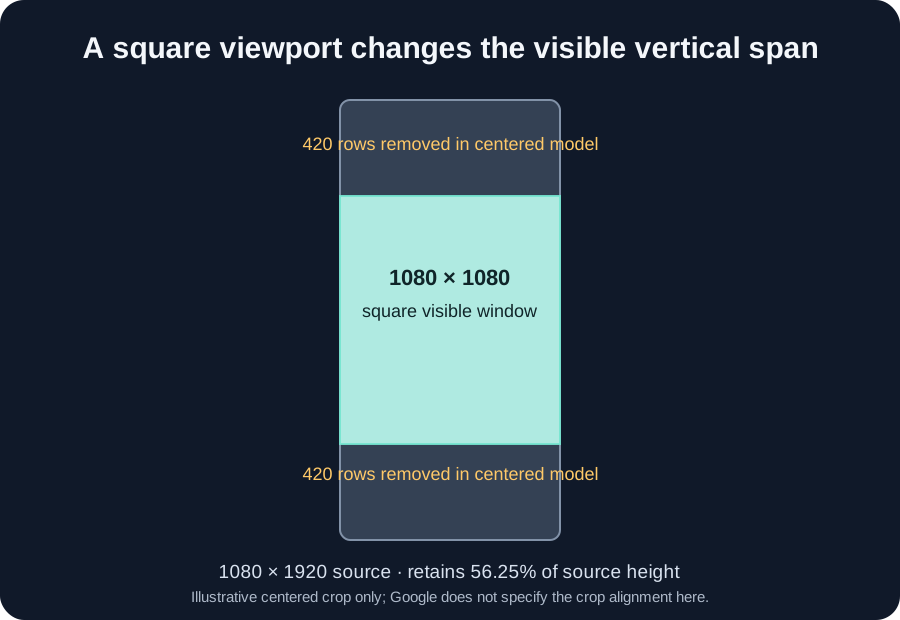
For a 1080 × 1920 source shown in a full-width 1080 × 1080 square window, 840 vertical rows fall outside the window: 43.75% of the source height. A centered-crop example removes 420 rows at each end. Google documents top-and-bottom cropping during some YouTube app interactions, but does not specify centered alignment or these pixel offsets.
What Google documents
Google Ads Help says the YouTube app player adapts to video dimensions. In its viewer-engagement section, it says a square or vertical video player can compress to a 1:1 ratio when a viewer interacts with the app, such as scrolling through related content. The page says that this crops the displayed video at the top and bottom. It does not give crop offsets in pixels or say that the crop is centered.
The calculation below uses a reproducible example: the player keeps the full source width and takes a centered square window. This shows the possible size of the crop under those assumptions. It is not a measurement of YouTube’s crop.
Work through a centered 1:1 example
Start with a 1080 × 1920 portrait frame. A square window that preserves all 1080 source columns can show 1080 rows, so its dimensions are 1080 × 1080. The remaining source height is 1920 − 1080 = 840 rows. If that window is centered, divide the removed height between the two edges: 840 ÷ 2 = 420 rows removed at the top and 420 at the bottom.
The retained share of source height is 1080 ÷ 1920 × 100 = 56.25%. The removed share is 840 ÷ 1920 × 100 = 43.75%. In the centered model, the square shows source rows 420 through 1499 when counted from zero. These row positions follow from the model assumptions; they are not values published by Google.
Try the model with a different portrait source. For width W and height H where H is greater than W, a full-width square window has height W. The removed height is H − W. A centered example removes (H − W) ÷ 2 from each end. Its retained height share is W ÷ H. For a 720 × 1280 source, that gives a 720-row window, 560 rows removed total, 280 per edge in a centered crop, and 720 ÷ 1280 = 56.25% retained.
Why a safe-zone overlay cannot show every playback state
A still overlay marks a region on the source frame; a player crop changes which source rows remain visible. Draw the modeled square window over the original frame so the two regions are easy to compare. Check text near either edge against that model, then review the exported video in its intended player.
Google’s guidance covers ad player behavior and placements. It does not say that every organic Short uses this square crop, and it gives no universal crop anchor. Keep the key message away from both edges when it must stay readable across player shapes. Then check the exported video in the intended context.
Reproduce the geometry yourself
Record the source width and height. For a full-width square example, make the window height equal to the width. Subtract the window height from the source height to find the rows outside the window. Split that number in half only for a centered example. Keep the centered split labeled as an assumption unless you measure a specific playback. The diagram uses these equations and identifies that assumption.
Questions and answers
Does Google publish a 420-pixel crop for Shorts?
No. Google says interaction can compress a vertical or square player to 1:1 and crop at the top and bottom. The 420-pixel value here is derived from a 1080 × 1920 source under a centered, full-width square-window assumption.
How much of a 1080 × 1920 source remains in a 1080 × 1080 square?
1080 ÷ 1920 × 100 = 56.25% of its height. The remaining 43.75% is outside that modeled window.
Does the square model replace my safe-zone overlay?
No. The overlay shows selected margins on the source. A crop model shows which source rows a different-shaped player might display. Check both, and inspect the actual target playback.
Can I infer the crop anchor from the help page?
No. The cited page says top and bottom are cropped but does not give pixel offsets or a centered-alignment rule.
Open the local frame checker · Compare source-frame shapes
Watch the short explanation
Original text-led geometry walkthrough; no visitor media is used.
Source: Google Ads Help: Use square and vertical video to engage mobile customers, “Viewer engagement with the YouTube app.” The cited section discusses ad player behavior; it does not specify the crop anchor for every Short. Checked 2026-11-08.