What happens when your source is not a portrait frame?
Short Frame Check keeps the decoded source dimensions. It does not crop a landscape image into a vertical Short. Its percentage margins follow your actual frame, so check a frame exported from your final vertical edit if that is what you plan to publish.
Our tool preserves the frame, not a fixed template size
The current load function reads an image’s naturalWidth and naturalHeight, or a video’s videoWidth and videoHeight. It assigns those values directly to canvas.width and canvas.height. The drawing call fills that same canvas with the source. There is no portrait conversion step in this path. The PNG download therefore follows the decoded frame dimensions rather than a preset vertical canvas.
The code labels a source with width greater than or equal to height as not portrait. A square image triggers that message too. This is a shape warning, not a file rejection. The code can still draw a readable square or landscape source and let you adjust the guide. The warning does not mean that YouTube has accepted or rejected your eventual upload.
Recalculate the guide before comparing two shapes
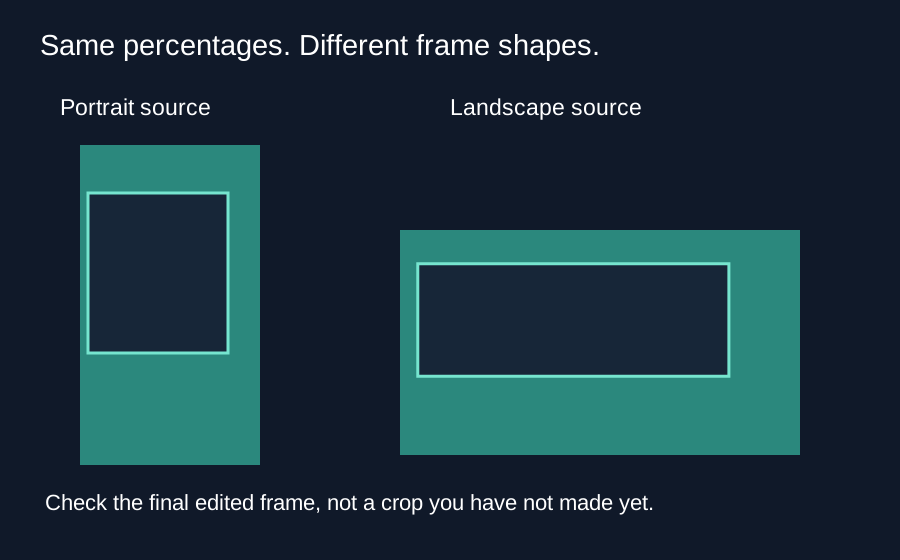
Here is an independent calculation from the tool’s default margin expressions. Left is 48 divided by 1080 of the width. Right is 192 divided by 1080 of the width. Top is 0.15 of the height and bottom is 0.35 of the height. The clear rectangle is bounded by x = width × 48 / 1080, right edge = width × (1 − 192 / 1080), y = height × 0.15, and lower edge = height × 0.65.
For a 540 by 960 example, these boundaries are x = 24, right edge = 444, y = 144, and lower edge = 624 pixels. Its clear rectangle is 420 by 480 pixels. For a 960 by 540 example, the boundaries are approximately x = 42.67, right edge = 789.33, y = 81, and lower edge = 351 pixels. Its clear rectangle is approximately 746.67 by 270 pixels. These are calculated tool coordinates, not measured YouTube interface positions.
The clear width fraction is 1 − 48 / 1080 − 192 / 1080 = 7 / 9. The clear height fraction is 1 − 0.15 − 0.35 = 0.5. Multiplying gives a clear rectangle area fraction of 7 / 18 in both examples. Equal area fractions do not imply equal layout: the rectangle changes shape with the source. This also shows why a percentage guide on a landscape frame cannot predict a later vertical crop.
Why the phone preview can be misleading
The canvas can be displayed smaller by the page’s responsive styling. That changes its on-screen size, not the canvas pixel dimensions used for export. A frame that looks narrow inside a phone browser is not automatically a vertical source. Read the source dimensions beside the preview before drawing a conclusion.
Suppose your editor later crops a landscape frame, scales it to fill a vertical sequence, or adds bars. Each operation changes the relationship between source coordinates and final display coordinates. Checking the original landscape source first does not validate the final crop. Export a representative frame from the completed sequence, load that frame here, and repeat the placement check on those final dimensions.
A short workflow
- Read the source width and height shown after loading.
- If you intend a vertical edit, finish its crop and scaling in your editor first.
- Export a still from that sequence and check it with the guide.
- Review other important moments and the published result on your phone.
Questions and answers
Will this checker add black bars?
No. It draws the source at its decoded dimensions; it is not an aspect-ratio converter.
Can I check a square image?
Yes, if the browser can decode it. The shape warning appears because width is equal to height.
Will the PNG become 1080 by 1920 automatically?
No. Check the output dimensions. Use your editor to create the final sequence size.
Does a clear guide rectangle guarantee safe placement on every phone?
No. This adjustable guide is a reference. Devices, crops and interface states can differ.
Open the tool · Choose the correct PNG export
Quick visual walkthrough
Text-led walkthrough without audio.