Why does the safe-zone guide line straddle its boundary?
The line is a visual stroke centered on the checker’s calculated margin path. Its painted pixels extend to both sides of that path; the margin coordinates and caption-fit calculation do not move.
Separate the path from the paint
The checker calculates the left guide path as frame width times the left-margin percentage. Its drawing call passes that coordinate to strokeRect, then sets a nonzero lineWidth. A canvas stroke is centered on its path. That makes the stroke a visual mark around the boundary, not a new margin measurement.
Read the current rule, then test a chosen frame
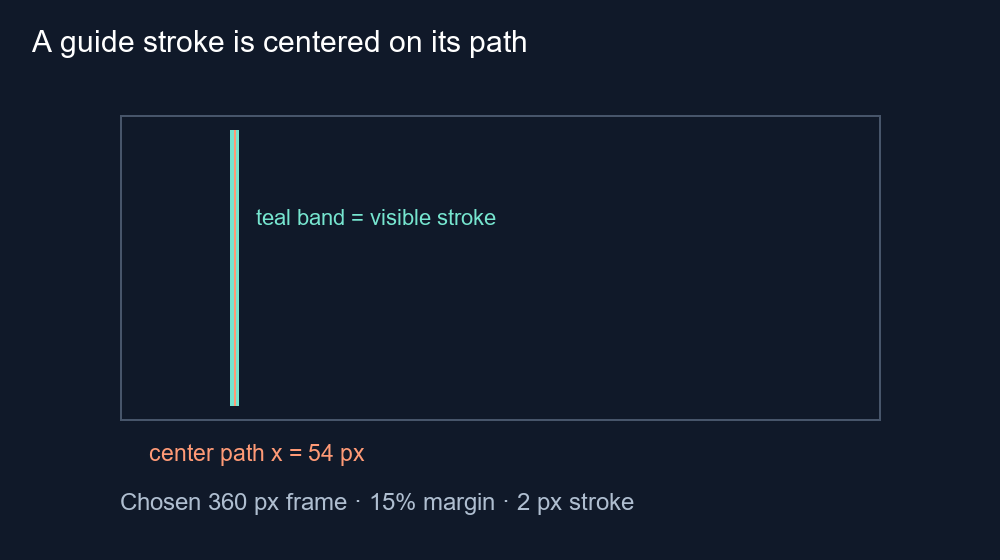
The live app.js sets stroke width to the larger of 2 pixels and frame width divided by 300. For a chosen 360-pixel frame, width divided by 300 is 1.2, so the rule selects a 2-pixel stroke. With a chosen 15% left margin, the path is 360 × 0.15 = 54 pixels from the left. The stroke is centered at x = 54; its ideal geometric extent is x = 53 to x = 55.
We rendered that vertical stroke in a 360 × 640 Chromium canvas and read its RGBA pixels at y = 200. The saved fixture records alpha at each nearby column, so the result is about this actual rasterization rather than a hand-drawn illustration. At fractional edges, antialiasing can distribute coverage across pixels; the pixels are not a guarantee about a phone interface.
What the caption warning compares
The same source code checks the caption box against the un-stroked values x, y, right and bottom. It does not expand those values by half of the line width. That is consistent with treating the line as a marker for the calculated boundary. If a caption visually touches the bright stroke, do not infer that the app has detected or measured a platform control there.
The screenshot-style comparison below uses a deliberately chosen margin and line width. It demonstrates the relationship between the mathematical path and the guide's visible stroke only. It does not establish an official YouTube safe-zone specification, measure Shorts buttons, or test every browser renderer.
How to use the marker
Use the inner edge of your chosen safe region as the intended coordinate, not the outermost colored pixel of a thick guide stroke. Leave practical visual breathing room for the real caption treatment and preview the exported frame. The stroke helps you see the line; it is not a safety buffer with a universal pixel allowance.
Questions and answers
Does the green stroke change the checker’s margin?
No. The source calculates the margin path from the selected percentage and draws a stroke around it.
Does this measure YouTube interface buttons?
No. The fixture tests the checker’s own guide rendering, not the YouTube app UI.
Should I place captions right against the colored line?
Leave practical clearance and check the real caption style in the exported frame.
Open the local frame checker · Read about rounded margin labels
Watch the short explanation
Text-led walkthrough without audio.