Does the rounded pixel label change the guide boundary?
No. The checker rounds its pixel labels for display, while the guide coordinates still come from the stored percentages and frame dimensions. Use those percentages when reproducing the geometry. A rounded margin label is not an exact boundary coordinate or a practical visibility guarantee.
The display and drawing follow different expressions
We inspected the current checker code. When a source is loaded, the margin label multiplies the margin percentage by the relevant frame dimension and rounds that result to a whole pixel. The drawing function separately calculates boundaries from the stored percentage. It does not replace those coordinates with the rounded label value. The label describes the reserved margin distance, not necessarily an edge coordinate measured from the top or left.
A right-margin example
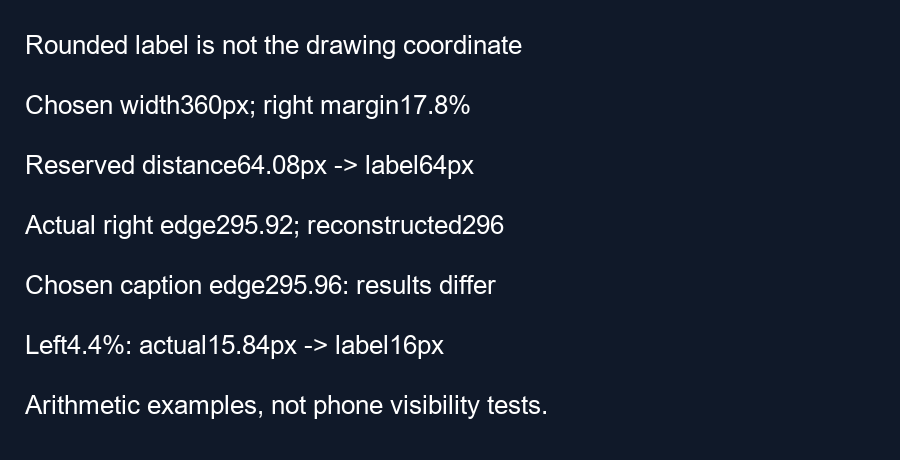
Choose a 360-pixel-wide frame and a custom right margin of 17.8 percent. The reserved distance is 360 times 0.178 equals 64.08 pixels. Its whole-pixel label is 64 pixels. The actual right boundary calculated by the drawing function is 360 times one minus 0.178 equals 295.92 pixels from the left edge.
If you reconstruct that boundary by subtracting the rounded label from frame width, you get 360 minus 64 equals 296 pixels. The reconstructed coordinate is 0.08 pixels farther right than the percentage-based boundary. The rounding has not moved the actual guide; it has discarded a fraction in the human-readable display.
A chosen edge exposes the difference
For a deliberately hypothetical caption right edge at 295.96 pixels, comparison with the rounded reconstruction says it fits because 295.96 is less than 296. Comparison with the actual boundary says it crosses by 295.96 minus 295.92 equals 0.04 pixels. Our script asserts these two different arithmetic results. This is a coordinate counterexample, not a claim that someone can reliably see a fraction of a pixel on a phone.
The opposite sign can appear on the left
Choose a left margin of 4.4 percent on the same frame. Its unrounded distance and boundary are 360 times 0.044 equals 15.84 pixels. The whole-pixel label is 16. A hypothetical caption left edge at 15.9 pixels is inside the actual boundary by 0.06 pixels. Treating the rounded label as the exact boundary would instead call it 0.1 pixels outside. Rounding can change a near-edge comparison in either direction.
These chosen margins are within the current horizontal slider range. The calculation script checks their distances, rounded labels and the two edge examples. It does not measure text, anti-aliasing, the drawn line's visible thickness or YouTube interface geometry. Those are separate questions. Do not use these tiny numerical clearances as practical visibility guarantees.
Use the percentage for reproducible geometry
When reproducing a guide in another editor, keep the original frame dimensions and margin percentages with your notes. A rounded pixel label is useful for orientation, but it loses fractional information. Review the full exported caption treatment with meaningful visual clearance rather than positioning it against a reconstructed rounded edge.
Questions and answers
Does the rounded number snap the guide to a whole pixel?
The current drawing code uses the percentage-based coordinate independently of that label.
Is the right-margin number the right edge coordinate?
No. It is the reserved distance from the right side.
Should I aim for the example's tiny clearance?
No. These examples expose arithmetic differences, not reliable viewing margins.
Inspect your frame · Reuse margin percentages
Visual walkthrough
Text-led walkthrough without audio.