How do you map a safe-zone guide onto a letterboxed video preview?
For a letterboxed preview, subtract the empty margin before converting screenshot coordinates to source pixels. With a centered object-fit: contain preview, calculate the scale as min(boxWidth/sourceWidth, boxHeight/sourceHeight), then calculate the displayed image offset. Map a point with sourceX = (previewX − offsetX) / scale and the same equation for Y. If you skip the offset, the guide will be shifted.
Worked example: portrait video inside a square preview
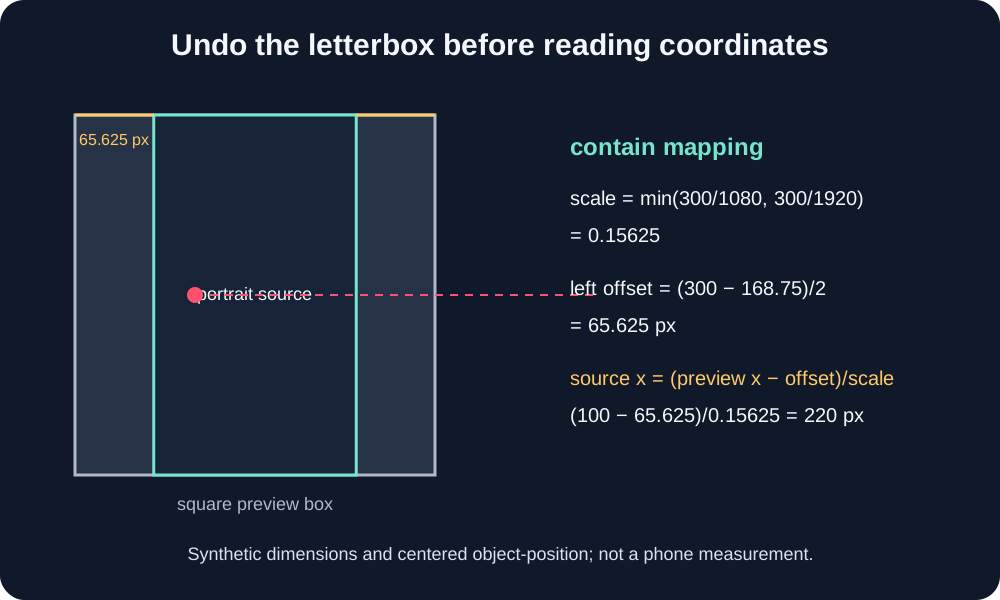
Use a synthetic 1080 × 1920 source inside a 300 × 300 CSS content box. The contain scale is min(300/1080, 300/1920) = 0.15625. The displayed image is therefore 1080 × 0.15625 = 168.75 CSS pixels wide and 1920 × 0.15625 = 300 pixels high. With centered positioning, each side margin is (300 − 168.75) / 2 = 65.625 pixels.
Suppose a point in the preview screenshot lies at x = 100 and y = 150, measured from the square content box’s top-left. Its source position is (100 − 65.625) / 0.15625 = 220 px horizontally and (150 − 0) / 0.15625 = 960 px vertically. The image’s horizontal center is x = 150 in the preview and x = 540 in the source, which provides a quick arithmetic check.
A safe-zone rectangle must use the same transform. Convert both its left/right edges and top/bottom edges; do not scale its width and height while leaving its position untouched. For an overlay already aligned to the full square box, remove the side offset from each horizontal edge before dividing by the scale.
What changes with cover or a shifted preview?
For object-fit: cover, use max(boxWidth/sourceWidth, boxHeight/sourceHeight). The displayed object exceeds the box on one axis, so the clipped offset is negative when centered. For object-position other than the center, calculate the actual content offset from that alignment instead of assuming equal margins. MDN describes object-fit as controlling how an image or video is resized inside its box, and object-position as controlling alignment. Borders, padding, screenshot scaling, browser zoom and editor overlays add further offsets; measure the actual content box before applying this model.
These numbers are a reproducible geometry example, not a measurement from a phone, editor or YouTube screen. A screenshot can also be resized after capture. Use the screenshot’s pixel scale and the preview’s actual content bounds, then inspect a real frame before publishing.
Calculation record
For source size (Ws, Hs) and preview box (Wb, Hb), contain scale is s = min(Wb/Ws, Hb/Hs). For centered contain, ox = (Wb − sWs)/2 and oy = (Hb − sHs)/2. The inverse mapping is xs = (xp − ox)/s, ys = (yp − oy)/s. The worked values above follow directly from these expressions.
Questions and answers
Why does a guide look shifted in a square video preview?
The portrait image occupies only part of the square box under centered contain. Subtract the side letterbox offset before converting preview coordinates.
Can I use the same formula for a cropped preview?
Use the cover scale and account for the crop offset. A centered crop has negative offsets on the clipped axis; a shifted object-position changes them.
Does this example describe a real phone screenshot?
No. It uses chosen dimensions to demonstrate the transform. It does not measure a phone, editor or YouTube UI.
Open the local frame checker · Read how to compare screenshot positions
Watch the short explanation
Original coordinate walkthrough with locally generated narration and captions.
References: MDN: object-fit; MDN: object-position. For topic context, OrsonLord and CreateComfy describe overlay templates; Kreatli offers an uploadable checker. Those pages were read for topic and structure, not as evidence for this coordinate transform. The worked example is independently calculated from its stated dimensions.