Does overlay opacity change the YouTube Shorts safe zone?
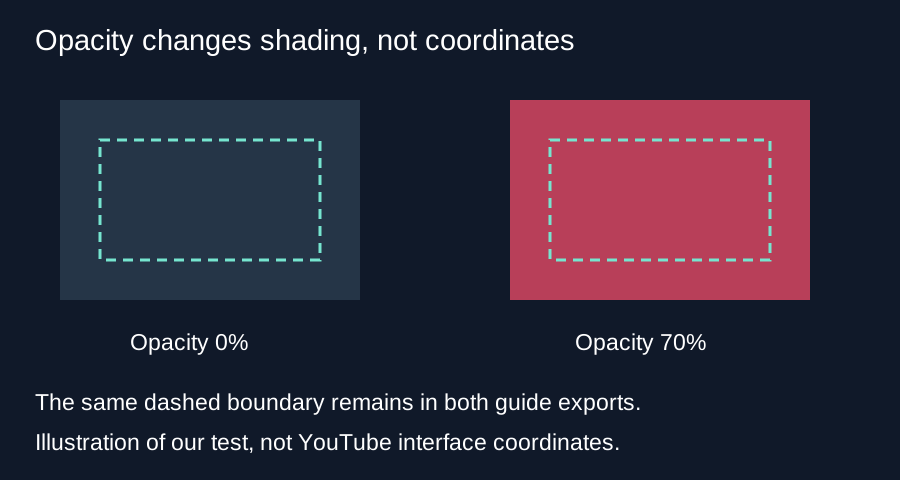
Changing Overlay opacity in Short Frame Check changes the red shading. The margin coordinates and caption overlap test stay the same. At zero opacity, the dashed boundary can still appear. Use the margin controls to move the boundary and Show safe zone to hide the whole guide.
Two exports with the same margins
We opened our own 360 by 640 PNG in the live checker and downloaded two guide-only PNGs. Overlay opacity was zero for the first download and seventy percent for the second. We left all four margins unchanged and kept Show safe zone on. Both exported images decoded at 360 by 640 pixels.
At coordinate 180,20, a point in the top shaded region, the first file had RGBA values 0,0,0,0. The second had 255,81,110,179. Alpha uses an eight-bit channel: the theoretical calculation is 0.70 times 255 equals 178.5. The exported pixel rounded to 179. The red color stayed the same; the alpha channel made it visible.
At coordinate 180,200, inside the clear region, both exports had RGBA values 0,0,0,0. At coordinate 100,96, on a drawn section of the dashed top boundary, both had 118,229,207,255. That mint-colored stroke remained opaque even when the red shading was transparent. Setting shading opacity to zero therefore did not remove every visible part of the guide.
The coordinate calculation does not use opacity
For this source, the left boundary is 360 times 48 divided by 1080, which equals 16 pixels. The right boundary is 360 times one minus 192 divided by 1080, which equals 296 pixels. The top boundary is 640 times 0.15, or 96 pixels. The bottom boundary is 640 times one minus 0.35, or 416 pixels. None of these expressions includes the opacity value.
The implementation uses opacity only when it builds the red fill color. It sets the dashed stroke color separately. Its caption-reference test compares the caption rectangle against the same left, right, top and bottom coordinates. A lighter fill can make the source easier to see, but it cannot make an overlapping caption rectangle fit.
What the pixel difference tells us
We compared the two decoded PNGs at each coordinate and counted a difference whenever any RGBA channel changed. There were 140,181 different positions out of 230,400. The total number of positions is 360 times 640. This count describes changed pixels in these two files. It is not a safe-area percentage, an accuracy measurement or a count of blocked pixels in YouTube.
Boundary strokes and partially covered edge pixels affect that comparison. Counting nontransparent pixels alone would mix the shaded regions with the dashed line. Keep the geometry calculation separate from the alpha-channel inspection when reproducing the test.
These findings concern this checker and one browser export. The default margins are an advertising reference; organic Shorts layouts and phone interfaces can differ. The test does not establish a universal YouTube safe zone. Adjust the reference margins for your review and check the finished upload on your phone.
Choose the control for the change you need
Lower opacity when the red tint makes the source hard to inspect. Change a margin when you need to move an edge. Uncheck Show safe zone when you want to remove the shaded regions and dashed boundary. The separate caption-reference switch can still draw its own text box.
Questions and answers
Why does the dashed line remain at zero opacity?
The opacity slider controls the red fill. The tool draws the mint boundary with a separate stroke color.
Does lighter shading mean more room for captions?
No. The same margin coordinates still define the reference area.
Does opacity alter the caption overlap message?
The overlap calculation does not use opacity. Change the caption position, its text, or a margin to affect that comparison.
How do I hide the complete guide?
Turn off Show safe zone. Turn off Show caption reference too if you want neither drawing in your preview.
Try the opacity control · Hide guides before export
Visual walkthrough
Text-led walkthrough without audio.