Why should you check the safe zone again after cropping a frame?
Cropping changes the frame origin and can change its shape. A caption that cleared your old guide may cross a guide fitted to the new frame. Finish the crop first, then review the actual caption against margins on that final frame. An old preview does not establish clearance after a crop.
Our saved-image crop experiment
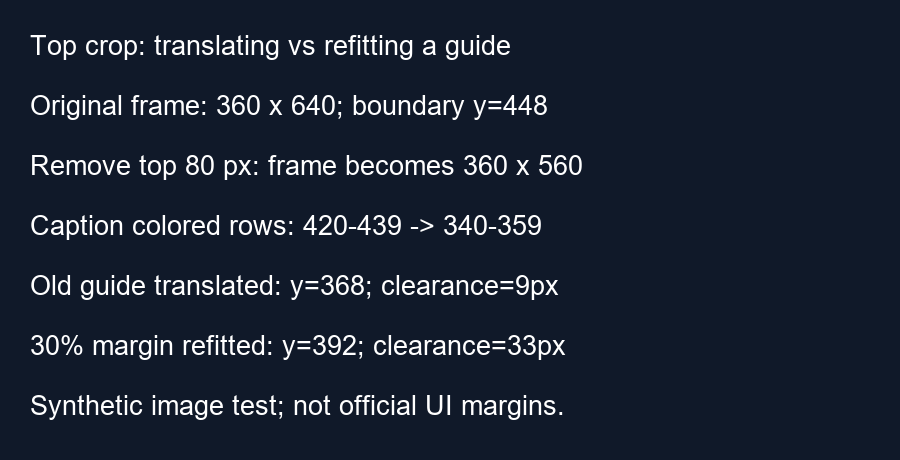
We made a synthetic 360 by 640 image with a green caption-like rectangle spanning y equals 420 through 439. We used an illustrative bottom boundary at y equals 448, equivalent to a 30 percent bottom margin. Before cropping, the rectangle's lowest colored row was 439. The clearance measured from that row to the boundary was 448 minus 439, or 9 pixels.
We then removed 80 pixels from the top, using a crop box from x equals zero, y equals 80 to x equals 360, y equals 640. The resulting image was 360 by 560. Reading the colored rows from the saved cropped PNG gave y equals 340 through 359. This matches the coordinate transform: old y minus 80 equals new y. The image content moved upward relative to the new origin.
Now fit the same illustrative 30 percent bottom margin to the cropped frame. The new boundary is 560 times one minus 0.30, or 392 pixels. The caption-like rectangle's lowest colored row is 359, so its new clearance is 392 minus 359, or 33 pixels. That is a change of 24 pixels from the original 9-pixel clearance.
Following content is different from fitting a new guide
If we crop the original guide together with the source, its old boundary follows the same translation. It moves from 448 to 368 pixels. That translated boundary still has 9 pixels of clearance above the lowest colored row at 359. But a guide refitted to 30 percent of the new height ends at 392, not 368. The difference is 392 minus 368, or 24 pixels. Both operations can be intentional, but they answer different questions.
The general difference in this top-crop example is crop height times bottom-margin fraction: 80 times 0.30 equals 24. Translating the old boundary preserves its distance from the content. Refitting percentages preserves the margin as a fraction of the new frame. Neither operation measures YouTube's actual interface.
Reproduce and interpret the check
Draw the rectangle on a blank image, save it, crop the top strip and save the result separately. Scan the saved images for green pixels to recover the occupied rows. Our script asserts the original range, the cropped range and the new dimensions before calculating clearance. It does not run a video editor, test a phone or claim that every real crop improves clearance. Cropping another edge, moving content or scaling afterward requires its own coordinates.
Before publishing
Check the final output dimensions. Generate a new reference for that frame or deliberately transform the old one. Inspect the entire caption, then hide the editing guide before exporting. Review moving captions at more than one moment.
Questions and answers
Does the checker crop my uploaded video?
No. Make the crop in your editor, then load a frame or video with the resulting dimensions.
Should I keep my old percentage values?
You can reuse them as a starting reference, but inspect the new composition. The same percentages can describe a different shape.
Does the experiment give official Shorts margins?
No. Its chosen margin isolates the effect of a crop.
Check your final frame · Review resized layers
Visual walkthrough
Text-led walkthrough without audio.