Can scaling a caption around a different anchor change its guide clearance?
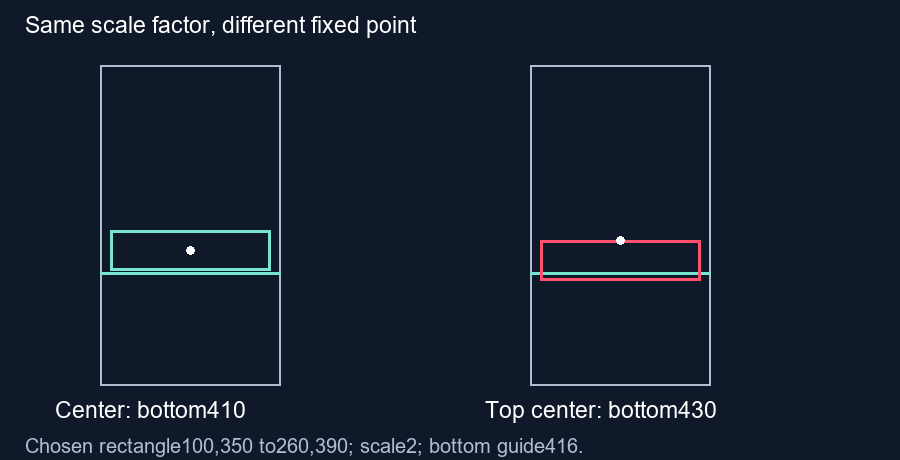
Yes. Scaling around a different anchor can change the caption position as well as its size. Our chosen rectangle leaves bottom clearance when doubled around its center, but crosses the same boundary when doubled around its top center. Check the full transformed bounds in your export.
Keep the starting rectangle identical
We chose a synthetic caption rectangle with left edge 100, right edge 260, top 350 and bottom 390 inside a 360 by 640 frame. Its center is (180,370), width 160 and height 40. The chosen guide bottom is 416. Initially the box leaves 26 pixels of clearance. These coordinates are construction inputs, not measurements of a subtitle or of a phone interface.
Scale the same box around two anchors
For uniform scaling, each point changes according to Pnew equals A plus s times (P minus A). Here P is an original corner, A is the chosen anchor and s is the scale factor. We use s equals 2 in both cases. The factor alone therefore cannot describe where the resulting rectangle lands.
First use the rectangle center (180,370) as the anchor. The original bottom at 390 becomes 370 plus 2 times (390 minus 370), or 410. The top becomes 330. The width becomes 320 and the height becomes 80. Its lower edge still has 6 pixels of clearance above the chosen bottom guide.
Now use the original top-center point (180,350) as the anchor. The top remains 350, while the bottom becomes 350 plus 2 times (390 minus 350), or 430. The resulting rectangle is still 320 by 80, but its lower edge crosses the same boundary by 14 pixels. The anchors produce identical sizes and different positions.
Check all four transformed corners
Our saved calculation transforms each corner independently and takes the minimum and maximum coordinates. With the center anchor, the bounds are (20,330) to (340,410). With the top-center anchor, they are (20,350) to (340,430). Subtracting these coordinates confirms a 20-pixel downward difference at both vertical edges, while the horizontal bounds stay unchanged.
This example isolates bottom clearance. Neither enlarged rectangle fits the tool's chosen default right boundary at 296: both reach 340. Passing a bottom check does not establish that the whole rectangle fits. We deliberately retain that limitation rather than presenting the center-anchor result as an overall safe placement.
Calculate the anchor contribution directly
For the same original point and scale, changing the anchor from A1 to A2 changes the result by (1 minus s) times (A2 minus A1). The second anchor is 20 pixels higher. At scale 2, multiplying that upward difference by minus 1 produces a 20-pixel downward shift. Our script asserts this identity for every corner as a separate check on the bounds calculation.
This is a fixed geometric example. An editor may compensate position when changing its anchor or may combine scale with other transforms. The preview checker does not apply this experiment to your subtitle layer. Inspect the final exported styling and verify every relevant edge; use intermediate frames if the transform changes over time.
Questions and answers
Can equal scale values produce different clearance?
Yes. The anchor determines which point remains fixed during this chosen scale operation.
Does changing the anchor always move an existing caption?
That depends on how the editor handles its anchor and position controls. This example does not measure a specific editor.
Is passing the bottom boundary enough?
No. Check the full exported box, including side edges and effects.
Inspect your exported frame · Check rotation bounds
Visual walkthrough
Text-led walkthrough without audio.