Can rotating a caption make it cross the guide without moving its center?
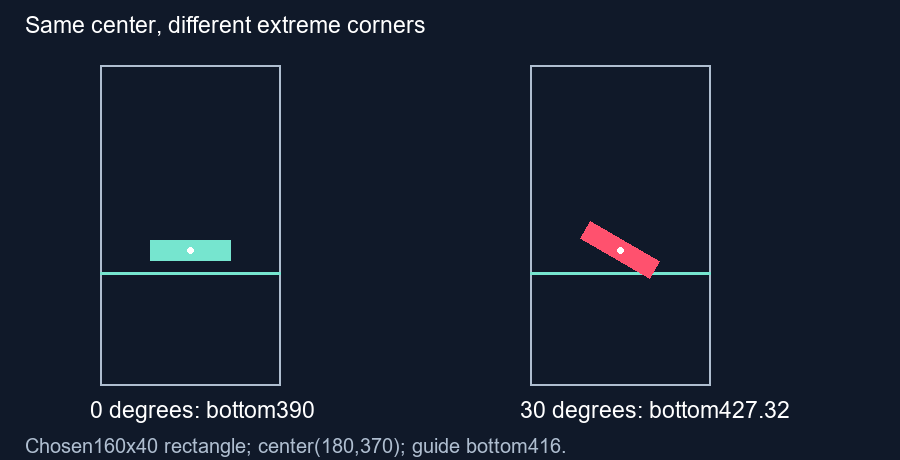
Yes. A rotated caption can reach farther toward a guide even when its center stays in the same place. Check its extreme corners and the complete exported styling. Our chosen rectangle fits before rotation but crosses the bottom guide after a 30-degree turn.
Hold the center fixed and rotate the box
We created a synthetic caption background measuring 160 by 40 pixels inside a 360 by 640 frame. Its center stays at x equals 180 and y equals 370. The chosen guide bottom is 416 pixels, matching this tool's default bottom percentage for that frame height. These dimensions describe our experiment rectangle, not a measured subtitle or a universal phone interface.
Before rotation, half the box height is 20 pixels. Its bottom is therefore 370 plus 20 equals 390, leaving 26 pixels above the guide. Its left and right edges are 100 and 260. The rectangle fits the chosen guide.
Rotation changes the outer extent
For a rectangle of width W and height H rotated through angle A about its center, the vertical extent of its axis-aligned bounds is the absolute value of W times sine A plus the absolute value of H times cosine A. The horizontal extent is the absolute value of W times cosine A plus the absolute value of H times sine A. These bounds describe the rotated rectangle's extreme coordinates; its center alone does not capture them.
Choose an angle of 30 degrees. The vertical extent becomes 160 times 0.5 plus 40 times approximately 0.8660254, or approximately 114.641016 pixels. Half is approximately 57.320508. With the center still at 370, the lowest point reaches approximately 427.320508. It crosses the chosen bottom boundary by approximately 11.320508 pixels.
The horizontal extent is approximately 158.564065 pixels, giving edges near 100.717968 and 259.282032. Those stay between the chosen side guide boundaries of 16 and 296. This example fails at the bottom because rotation increases its vertical reach, despite keeping the center fixed.
Verify the extreme corners independently
Our script rotates all four local corners around the chosen center, then takes the minimum and maximum coordinates. It asserts that the resulting width and height match the sine-and-cosine expressions. We save the corner coordinates and render the unrotated and rotated polygons side by side. The image is an illustration of this geometric construction, not a measurement of anti-aliased font pixels.
For this same rotated box, the latest center that keeps its lowest point at the boundary is approximately 416 minus 57.320508 equals 358.679492 pixels. Moving only the center is one possible geometric adjustment; it does not establish readability or suitability of that placement.
Inspect the complete exported style
The current typed reference has its own drawing and does not reproduce arbitrary rotation from your editor. Review a frame showing the actual rotated subtitle, including its background and effects. If it rotates over time, check intermediate positions too. Fonts, shadows, different rotation pivots and changing scales require their own bounds; this fixed rectangle does not certify them.
Questions and answers
Does a fixed center guarantee a fixed footprint?
No. Rotation can change the extreme coordinates of a rectangular caption.
Does the checker rotate my real subtitle?
No. Make that change in your editor, then inspect the exported frame.
Is the example angle a recommendation?
No. It is a chosen input for a reproducible geometric example.
Review the exported frame · Check intermediate motion
Visual walkthrough
Text-led walkthrough without audio.