How far left must a caption move to fit asymmetric margins?
Use the whole caption-box width to find the allowed center interval: left edge plus half the box width, through right edge minus half the box width. Move the caption in your editor into that interval. If the interval is empty, sideways movement alone cannot make it fit.
Derive the possible center positions
Let L be the left guide edge, R the right guide edge, B the complete caption-box width and C its horizontal center. The box fits horizontally when C minus B divided by two is at least L, and C plus B divided by two is no greater than R. Rearranging gives an interval: L plus B divided by two is no greater than C, and C is no greater than R minus B divided by two.
This interval exists only when B is no greater than R minus L. If the caption box is wider than that available space, moving it sideways cannot solve the overlap. Its width must change or the chosen margins must change. These statements concern the whole box, including padding, rather than just the visible letters.
A reproducible asymmetric example
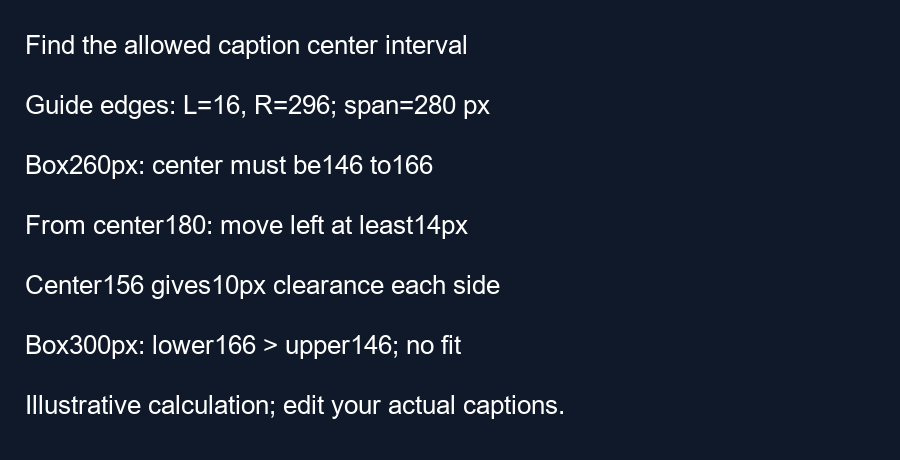
For a 360-pixel frame, the checker's default left edge is 360 times 48 divided by 1080, or 16 pixels. Its right edge is 360 times one minus 192 divided by 1080, or 296 pixels. The available horizontal span is therefore 296 minus 16, or 280 pixels. These are the tool's current reference values, not a universal measurement of the Shorts interface.
Choose an illustrative caption-box width of 260 pixels. Its allowed center interval runs from 16 plus 130 equals 146, to 296 minus 130 equals 166. A frame-centered caption has center 180, so it lies outside that interval. The smallest leftward move that makes this box fit is 180 minus 166 equals 14 pixels. At center 166, the left edge is 36 and the right edge is 296. It just touches the right boundary.
For a little more room, the midpoint of the allowed interval is 156. That position requires moving left by 24 pixels from the frame center. The box edges then become 26 and 286, leaving 10 pixels on each side inside the guide. The clearance here is horizontal only. It says nothing about the top or bottom edges.
A case that no sideways move can fix
Increase the illustrative box width to 300 pixels. The lower center bound becomes 16 plus 150 equals 166, while the upper bound becomes 296 minus 150 equals 146. A center cannot simultaneously be at least 166 and at most 146. Our calculation script asserts this reversed interval and separately checks the fitting edges for the narrower example.
The checker currently centers its typed reference horizontally and offers a vertical position control. It does not offer a horizontal caption-position slider. Use these calculations to reason about a caption in your own editor; do not look for a sideways control that this tool does not have. We calculated schematic boxes, without measuring a font or testing a phone.
Apply it to the actual caption
Measure the complete box in your editing project. If it is too wide, shorten the text or change line breaks before trying position changes. After a sideways move, check all four edges in the final exported frame.
Questions and answers
Can moving upward fix a right-edge overlap?
Not by itself. It changes a vertical coordinate.
Can the checker move my real subtitles left?
No. Change those subtitles in your editor.
Does touching the guide guarantee safe placement?
No. The guide is a reference, and interface layouts can differ.
Inspect your caption visually · Separate width and vertical position
Visual walkthrough
Text-led walkthrough without audio.