Does the order of moving and scaling a caption change its guide clearance?
It can. Moving before scaling can also scale the movement when the scale pivot stays fixed. Our chosen rectangle clears the bottom guide when scaled then moved, but crosses it when the same movement comes first. Inspect the final exported bounds rather than relying on the two control values alone.
Define the operations before comparing them
We constructed a rectangle spanning x coordinates 100 to 260 and y coordinates 350 to 390 inside a 360 by 640 frame. Its center is (180,370). Choose a fixed scale pivot at that original center, a scale factor of 1.5 and a downward translation of 12 pixels. The chosen bottom guide is at y equals 416. These are geometric inputs, not a test of a specific editor or a phone interface.
Scaling a point P around pivot A means A plus s times (P minus A). Translating a point means adding displacement T. We deliberately keep A fixed in frame coordinates in both orders. If an editor instead moves the pivot along with the object, this construction no longer describes that behavior.
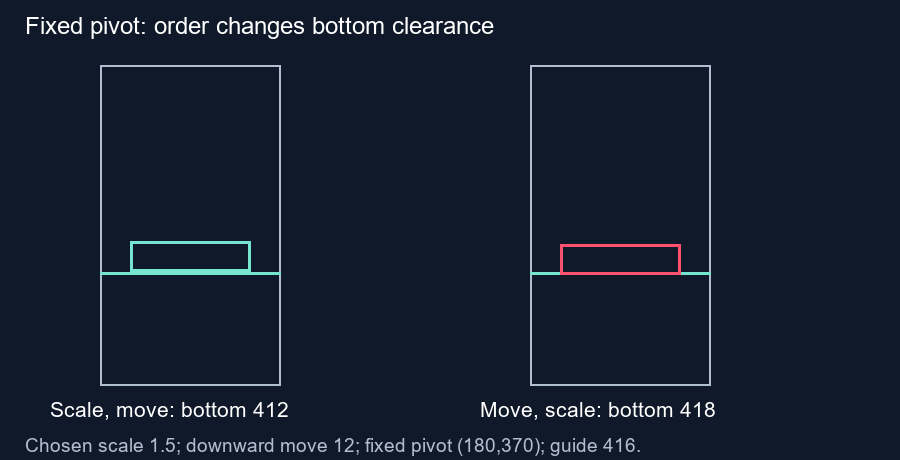
Scale first, then move
The original bottom is 20 pixels below the pivot. Scaling makes that distance 30 pixels, giving a bottom at 400. Adding the 12-pixel movement puts it at 412, leaving 4 pixels of bottom clearance. The top changes from 350 to 340 and then 352.
For this order, transforming every corner yields the bounds (60,352) to (300,412). The resulting width is 240 and height is 60. Bottom clearance alone is the quantity being tested. Both orders extend beyond a right guide at 296, so neither result is a complete fit inside that chosen guide rectangle.
Move first, then scale around the fixed pivot
Translation first moves the original bottom from 390 to 402. Relative to the unchanged pivot at 370, that distance is now 32 pixels. Multiplying by 1.5 gives 48. The final bottom is 418, which crosses the chosen bottom guide by 2 pixels.
The original top first moves to 362, then scales to 358. The full transformed bounds are (60,358) to (300,418). Size is unchanged between the two orders, but every point in this result sits 6 pixels lower. Swapping the order changes the bottom check from a positive clearance to an overlap.
Check the difference without redoing the corners
Scale then move gives A plus s times (P minus A) plus T. Move then scale gives A plus s times (P plus T minus A). Subtracting the first expression from the second leaves (s minus 1) times T. With our inputs, 0.5 times a 12-pixel downward movement equals 6 pixels downward. Our script checks this identity for every corner and also compares the results with separate homogeneous transformation matrices.
The same calculation gives different movement limits for the chosen bottom. After scaling, the bottom is 400. Scale then move allows a downward displacement up to 16 before touching 416. Move then scale, with the pivot fixed, allows 16 divided by 1.5, or approximately 10.666667. These limits apply only to this constructed rectangle and this bottom boundary.
Use the exported frame to resolve editor behavior
A group transform, local coordinate system or position compensation can change what a set of controls means. This article establishes the two stated mathematical operations. It does not claim that a named editor uses either order. Check the rendered subtitle, background and effects after changing grouped transforms; inspect intermediate frames if they animate.
Questions and answers
Will the same size guarantee the same placement?
No. Both constructed results have the same dimensions and different vertical bounds.
Is this what every editor does?
No. The calculation requires a fixed pivot in frame coordinates. Editors can handle pivots and groups differently.
Can this checker change transform order?
No. Apply the change in your editor and review the exported frame here.
Review your exported frame · Compare scaling anchors
Visual walkthrough
Text-led walkthrough without audio.