Why can an MP4 pass the file check but fail to load?
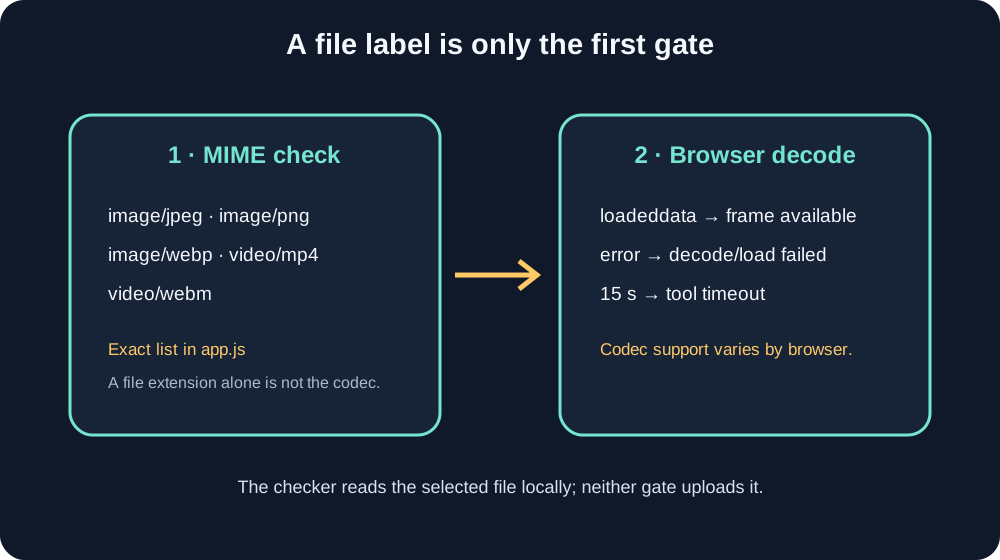
An MP4 can pass this checker’s file-type filter and still fail to load. The filter checks the browser-reported MIME type; the browser must then decode the video stream and provide a frame. MP4 is a container that can hold different codecs, and browser support varies. This checker reports a decode error or a 15-second timeout when the frame does not load.
What the checker checks first
The current app.js allowlist accepts image/jpeg, image/png, image/webp, video/mp4 and video/webm. It does not accept GIF. The code compares the selected file’s file.type string to that exact list; when the value is outside it, the status asks for a JPG, PNG, WebP, MP4 or WebM file.
A filename ending in .mp4 does not prove that its video codec can play in this browser. MDN explains that a container can hold different codecs and that browsers support different combinations. The selected file can pass the MIME gate as video/mp4, then fail during browser decoding.
Read the message as a branch
For video, this tool creates a local object URL and listens for loadeddata. That event lets the load step continue; the app then checks that the frame has nonzero width and height. If the video element fires error, the tool shows “This file or video codec is not supported by your browser.” If neither event resolves the attempt within 15,000 milliseconds, it shows “File could not be decoded. Try another file or browser.” If loading completes without readable dimensions, it reports “No readable frame found.” These messages come from the current source code, not from a test across every browser.
When an MP4 fails, try exporting a short local copy with H.264 video and AAC audio, then select that copy. MDN lists MP4 with AVC (H.264) and AAC as a broadly supported browser combination. Keep the original untouched. If the browser still raises an error, try a different browser with a compatible decoder. The page does not send either copy to a server.
Why a familiar extension may still be rejected
The browser supplies File.type. MDN notes that browsers generally infer this value from the file extension instead of inspecting its bytes; an unknown type can be an empty string, and local configuration can produce unexpected values. A file with an unusual extension may therefore fail the first gate before decoding begins. Re-exporting to a common MP4 or WebM extension can help with that first check, but it does not guarantee codec support.
Source audit: the findings above map to the current allowlist, the loadeddata/error listeners, the 15-second timer and the dimension check in app.js. The article does not claim that every file/browser combination was personally tested.
Questions and answers
Does “MP4 supported” mean every MP4 codec works?
No. The file-type gate accepts video/mp4; the browser still needs a decoder for the codecs inside the container.
Why does the checker reject a renamed video?
The browser-reported MIME type may not match the extension or may be empty. The tool checks that MIME value against its allowlist.
What should I try first?
Use a short local export in MP4 with H.264 video and AAC audio. That combination is broadly supported, though this does not guarantee every device can decode it.
Does the file leave my device during this check?
The source code creates a browser-local object URL and draws decoded frames to a canvas. This upload flow does not send the selected video to the site server.
Open the local frame checker · Read how local processing works
Watch the short explanation
Original source-code walkthrough. Captions are included. No visitor media is used.
References: MDN on Blob.type; MDN’s video codec guide; MDN on the media error event; YouTube’s Shorts upload help. A Reddit user’s HEVC-in-MP4 codec-error report is an anecdote, not a browser-compatibility test. For topic context, OrsonLord and CreateComfy describe overlay templates; Kreatli presents an uploadable checker. Those pages were not used as evidence about this site’s codec handling.