Does a safe-zone checker export a new video or a still image?
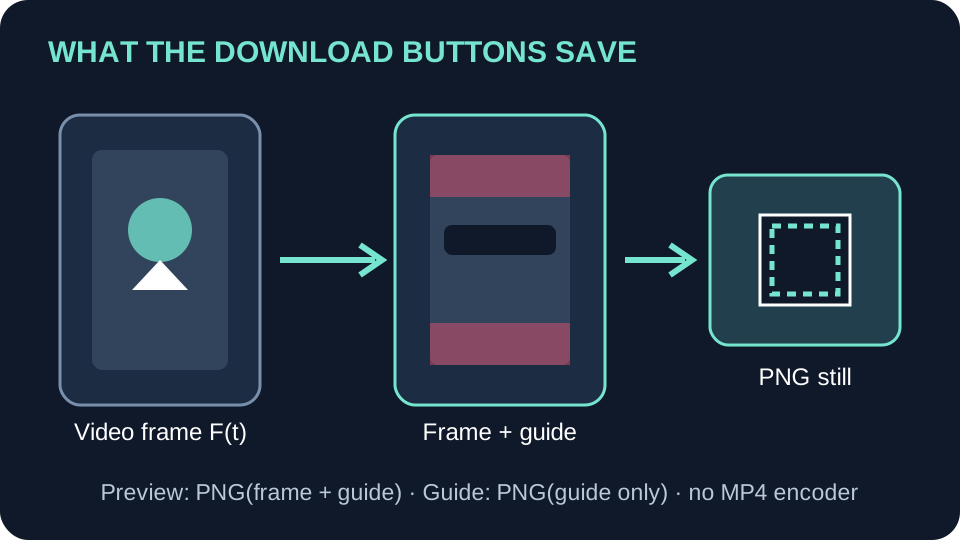
This checker downloads PNG images, not a modified video. “Download Preview” saves the frame currently shown on the canvas with the selected guide and reference caption. “Download Guide” saves a transparent PNG of the guide alone. Neither button exports video or audio.
Follow the two download paths
The page accepts MP4 and WebM files. After a video loads, it reads the browser-reported videoWidth and videoHeight and uses those values for the canvas bitmap. It draws the visible frame first, then paints the guide and optional sample caption over it.
For Preview, download(false) redraws the canvas and calls toBlob(..., "image/png"). Guide creates a second canvas with the same dimensions, paints the guide alone, and calls the same PNG encoder. That path passes false for the caption flag. Neither path sends the source video to a video encoder.
What each button produces
| Action | Canvas contents | File produced |
|---|---|---|
| Download Preview | Current video frame or source image, guide, and optional reference caption | PNG still image |
| Download Guide | Guide overlay only, with transparency | PNG still image |
| Neither action | Timeline, sound, or a complete rendered clip | No MP4 or audio file |
Dimensions and frame timing
For browser-reported dimensions W × H, the canvas is set to W × H. If the browser reports 540 × 960, the PNG canvas is 540 × 960. That is the canvas bitmap size; it does not identify the encoded stream or measure visual quality.
The page redraws while the video plays and when the playhead seeks. Download Preview captures the frame visible when you click. To keep a particular moment, pause, seek, wait for the preview to update, and download. The PNG contains no motion, audio, or timeline.
A compact model of the export
Let F(t) be the decoded frame visible at time t, G the selected safe-zone drawing, and C the optional reference caption. The preview export is P(t) = PNG(F(t) overlaid with G and C). The guide export is Q = PNG(G) with transparent pixels outside the guide. The conversion call names image/png, so both are still-image outputs.
These expressions describe this site’s code. Other checkers may export different files. To make a video with the guide burned in, add the clip and transparent guide to an editor, then render the timeline.
Questions and answers
Does Download Preview change my uploaded video?
No. It creates a PNG from the canvas; the source video is not rewritten by that download path.
How do I export the whole video with the guide?
Use a video editor. Add the source clip and the transparent guide on a separate track, then render a new video from the editor.
Will Download Preview capture every frame?
No. It captures the frame visible when you click. Pause and seek to inspect a specific moment.
Open the local frame checker · Browse all guides
Watch the short explanation
Original walkthrough of the checker’s two PNG download paths.
References: MDN: HTMLCanvasElement.toBlob() documents that the method encodes the image contained in a canvas; MDN: videoWidth describes the intrinsic video width. For topic context, OrsonLord and CreateComfy describe overlay workflows, while Kreatli provides an uploadable checker. Those pages are not evidence about this site’s export format. The implementation statements above come from this site’s current app.js.